Exchange API key security for trading bots: trade-only, IP-restricted, never withdrawals
October 4, 2026

A trading bot never needs your exchange password, and it never needs to hold your money. It needs one thing: an API key that lets it read your balance and place orders on your behalf. Your funds stay on the exchange, in your account, the whole time.
That makes the API key the most important security decision you take when you start automating. A well-configured key turns a worst case into an inconvenience. A badly configured one turns a small mistake somewhere else into a loss. This guide covers how to create the right key for Bitcator, what each setting protects against, and a short routine for keeping keys under control.
The right key in one picture
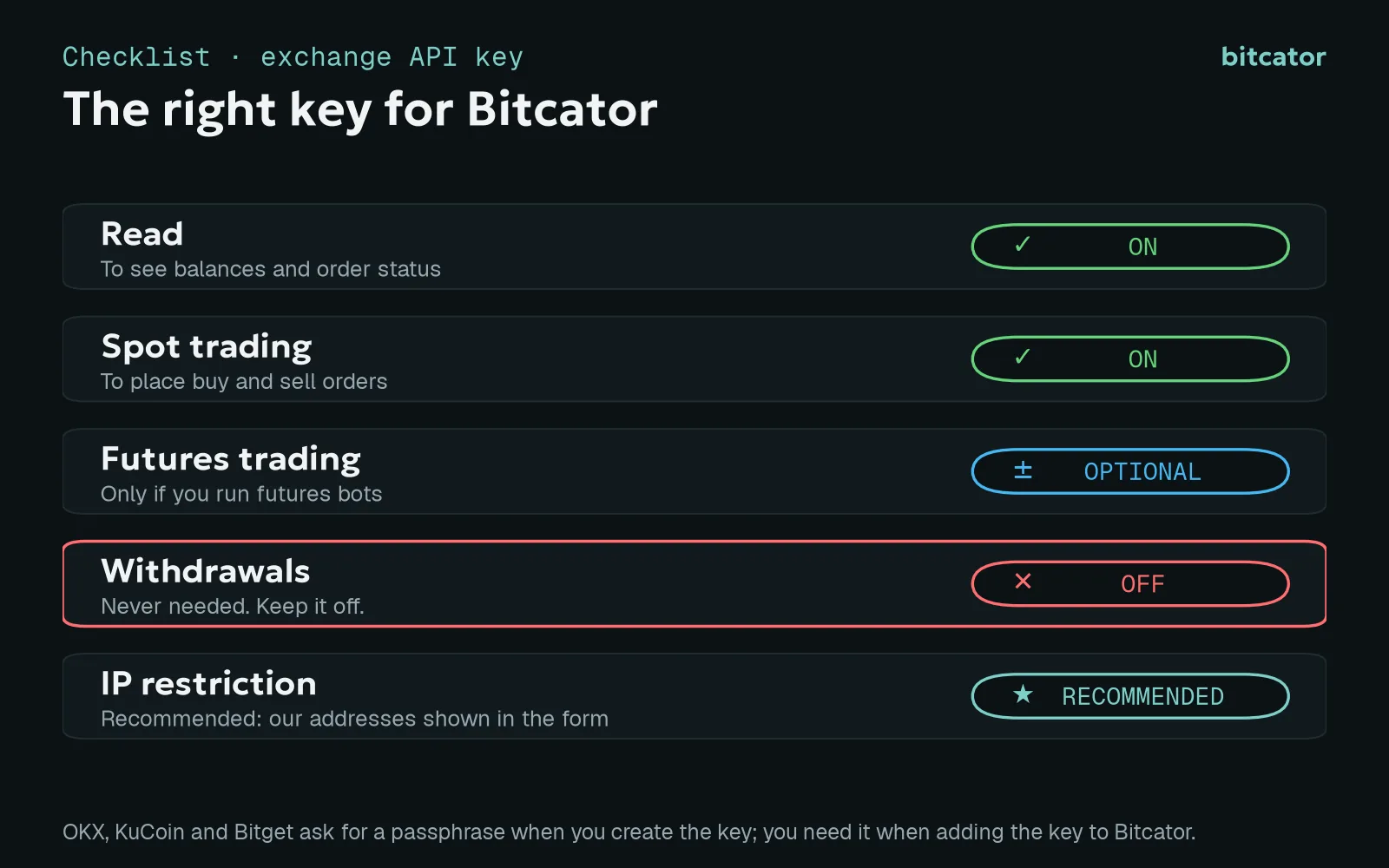
The permissions Bitcator needs. Names differ slightly per exchange.
Read. Lets the bot see balances, positions and order status.
Spot trading. Lets the bot place and cancel buy and sell orders.
Futures trading. Only if you run bots on USDT-M perpetuals. If you only trade spot, leave it off.
Withdrawals: off. Always. Bitcator never moves funds off the exchange and never needs this permission.
IP restriction: recommended. When the exchange form in Bitcator shows our IP addresses, restrict the key to them.
Each exchange labels these differently. A few examples from the guide shown in the exchange form:
Binance: choose a system-generated key, then tick Enable Spot & Margin Trading (and Enable Futures for futures bots).
OKX: choose API trading with the Read and Trade permissions.
Bybit: a system-generated key with Read-Write for Unified Trading (spot and contracts).
KuCoin: General and Spot Trading, plus Futures Trading for futures bots.
OKX, KuCoin and Bitget also ask you to set a passphrase when you create the key. Write it down: you need it, together with the key and the secret, when you add the key to Bitcator. Most exchanges show the secret only once, so copy it right away.
Why withdrawals must stay off
Withdrawal permission is what turns a leaked key into lost funds. With it, anyone who has the key can send your coins to an address they control. Without it, the worst a stolen key can do is trade inside your own account.
Bitcator does not ask for withdrawal permission and has no use for it. Check this setting yourself on the exchange when you create the key, because the exchange's API management page is where the permission is actually set. If an older key in your account has withdrawals enabled, do not edit it in place: create a new key with withdrawals disabled, replace it in Bitcator, and delete the old one on the exchange.
As an extra layer, many exchanges also offer a withdrawal address whitelist for your account. With it turned on, even a withdrawal you did not intend can only go to addresses you approved in advance.
What an IP whitelist protects against
A trade-only key is much safer, but not harmless. Someone who has a trade-only key cannot withdraw, yet could still place orders in your account, for example buying an illiquid coin at inflated prices to move value to another account on the other side of the trade.
An IP whitelist closes that door. The exchange only accepts requests signed with your key when they come from the listed addresses. A key restricted to Bitcator's addresses is useless anywhere else, even if it is copied. When the exchange form shows our addresses, add them to the key's IP restriction; if it does not, IP restriction is optional for that set-up.
How Bitcator stores your key
When you add a key, the API key, the secret and the passphrase are encrypted on our server the moment you save them. Only the trading engine can decrypt them, and only to sign your orders. Nobody can view them again, including you: the exchange page in Bitcator shows only a label and the last characters of the key, so you can tell keys apart.
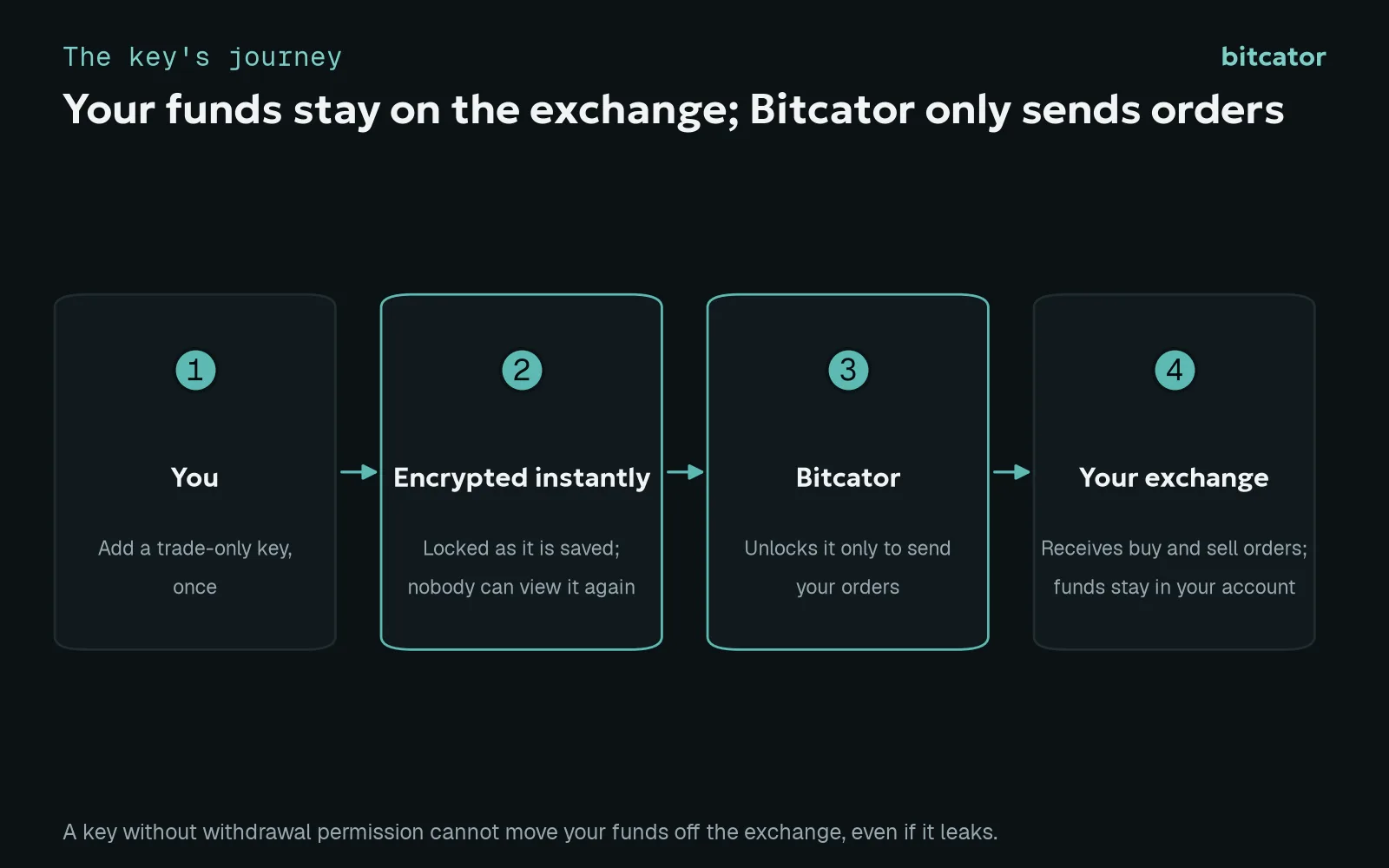
The key's journey from your exchange to your orders.
After you add a key, Bitcator checks it against the exchange by reading your balance. If the check fails, the exchange page shows the reason: the exchange rejected the key, or the key is missing permissions. A rejected key usually means a key or secret copied with a missing character, a wrong passphrase, or an IP whitelist that does not include our addresses. Fix it on the exchange and verify again.
Your Bitcator account deserves the same care as your exchange account. Turn on two-factor authentication or add a passkey in your security settings; changing your password signs out your other sessions.
A routine for keeping keys under control
One key per purpose. Create a separate key for Bitcator, labelled clearly. Never reuse a key you gave to another service. If one service has a problem, you revoke one key, not all of them.
Minimum permissions. Read and the trading you actually use. Futures only for futures bots. Withdrawals never.
Restrict by IP whenever the form shows our addresses.
Consider a sub-account. Many exchanges let you run the bot on a sub-account that holds only the capital you assign to it. The key then only reaches that capital.
Rotate occasionally. Create a new key, add it, move your bots to it, then delete the old key on the exchange.
Never share the secret. Enter it only in Bitcator's exchange form. Treat anyone who asks for your API secret, passphrase or exchange password by chat, e-mail or phone as an attacker.
Know your emergency move. If you suspect a key has leaked, delete it on the exchange first: that stops it everywhere at once. Then review recent orders and log-ins on the exchange, and add a new key to Bitcator.
Security for a trading bot is not about trusting the bot more. It is about giving it exactly the access it needs, and nothing that could hurt you if something went wrong anywhere in the chain.
This article is for general security guidance and is not investment advice. Exchange settings and permission names change over time; always follow your exchange's own documentation when creating API keys.