Risk management for trading bots: position size, open positions and stop logic
October 4, 2026

A trading bot does not get tired, nervous or greedy. That is its strength, and it is also why risk management matters more with a bot than without one. A person who doubles a losing position at 3 a.m. is making a mistake once. A bot configured to do it will do it every time, on every pair, until someone changes the settings.
The good news is that a bot's risk is entirely visible before it trades. Every number that decides how much you can lose is in the configuration. This guide goes through those numbers in three layers: each trade, each bot and the whole account.
Layer 1: size each trade from the stop
The most useful question in position sizing is not "how much should I buy?" but "how much am I willing to lose if this trade is wrong?". Answer that first, then let the stop distance decide the size:
position size = (account × risk per trade) ÷ stop distance
With a 5,000 USDT account and a risk of 1% per trade, every trade may lose 50 USDT at its stop:
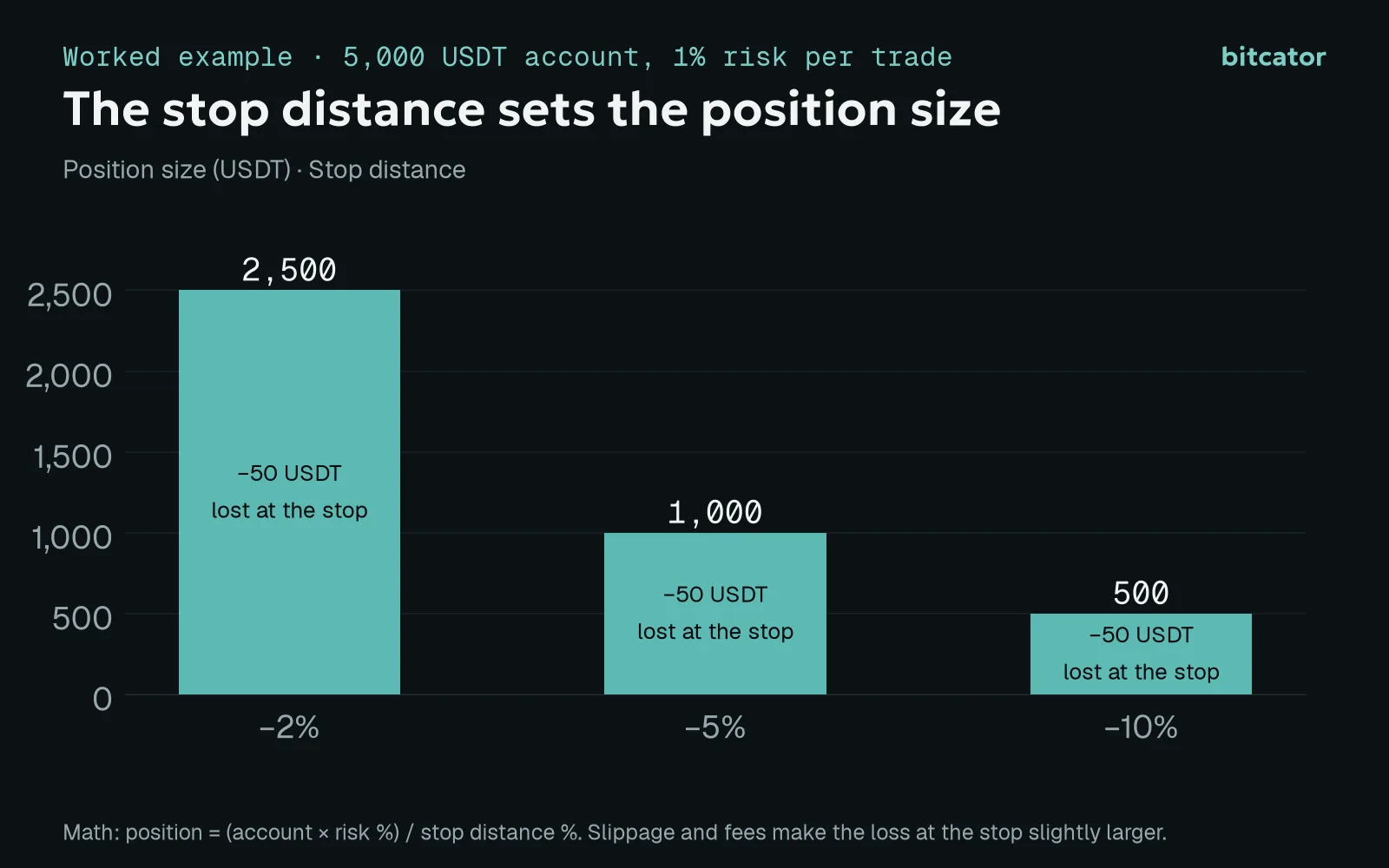
Worked example. Slippage and fees make the loss at the stop slightly larger.
Stop 2% away: position up to 2,500 USDT.
Stop 5% away: 1,000 USDT.
Stop 10% away: 500 USDT.
Notice what this does: a wider stop does not mean more risk, it means a smaller position. Choose the stop distance from how the asset moves (wide enough not to be hit by ordinary noise), then size the trade so that hitting it costs the amount you decided.
For a DCA bot, apply the same rule to the whole ladder, not to the first order. In our DCA guide, a five-order ladder of 1,318.75 USDT with a stop 8% below the average lost about 108 USDT including fees when the stop was hit: 2.2% of a 5,000 USDT account. If that is more than you want to risk per trade, shrink the ladder or move the stop, before the bot runs.
On perpetual futures, the order amount is already the position size; leverage only changes the margin. Size from the stop exactly as on spot, and keep the stop well inside the liquidation distance.
Layer 2: cap what each bot can commit
A single trade is rarely what hurts an account. Several trades going wrong together are. Two settings decide how much one bot can have open at once:
Concurrent trades limits how many pairs the bot can hold at the same time (1 to 50). DCA orders do not count as new trades: a bot limited to three trades can hold three positions with every DCA order filled.
Order amounts (and the DCA ladder) decide how much each of those trades can use.
The builder multiplies them for you and shows the worst case (all trades):
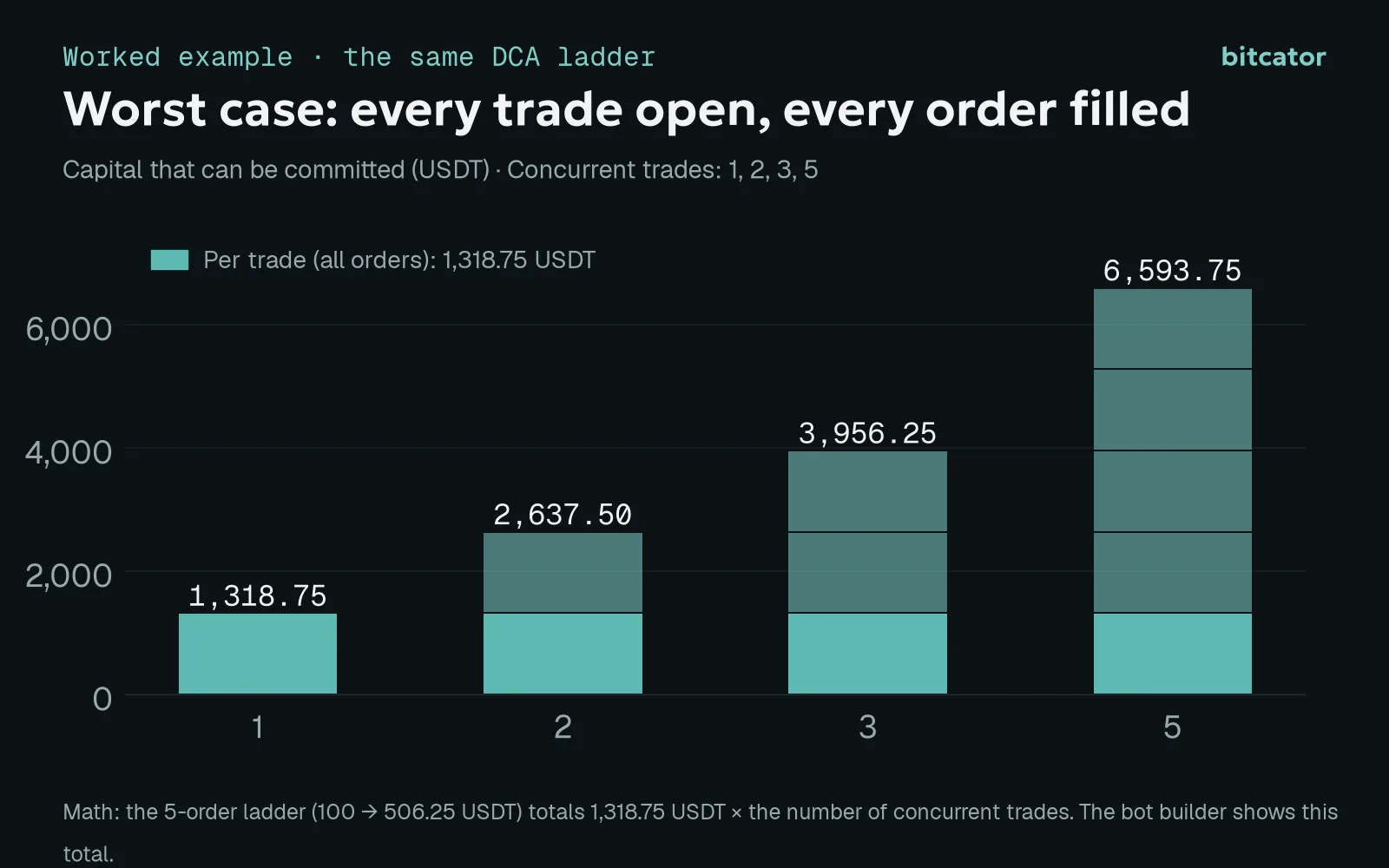
Worked example with the five-order ladder from our DCA guide.
That number is not a theoretical maximum you will never see. Crypto assets move together. On 10 October 2025, BTC fell about 16% from the day's open to its low on Binance spot; ETH and SOL fell more than 20%, and XRP, DOGE and ADA briefly traded 55–66% below their open. On a day like that, every open trade of a long bot fills its ladder at the same time. If the worst case is more than you can afford to have tied up in falling positions, lower the number of concurrent trades or the ladder before raising anything else.
Layer 3: think about the account, not just the bot
Count every bot. Two bots on different pairs are not two independent bets if both are long altcoins. Add up their worst cases.
Keep a cash buffer. A bot that runs out of USDT cannot place its DCA orders; a futures account without spare margin moves closer to liquidation. Leave free balance beyond the worst case.
Set a drawdown line in advance. Decide the total loss at which you stop all bots and review, and write it down while you are calm.
Use fewer, clearer strategies. Ten bots you understand partly are riskier than three you can explain completely.
Stop logic that fits the strategy
There is no single right stop. There is a stop that fits what the strategy is trying to do. Bitcator offers these building blocks:
Percentage stop, measured from the average entry (default) or from the last fill. Use the last fill if you think in DCA rungs; use the average if you think in total position loss.
Only after all DCA orders. Prevents the stop from firing before the ladder is complete. Use it only when the stop sits beyond the last rung; otherwise the ladder and the stop fight each other.
Spike protection. When the stop triggers, the bot waits a set number of seconds and checks again. It filters single-tick wicks, not trends.
Trailing stop. Follows the peak at the stop distance once the trade is at least 0.3% in profit, turning a stop loss into profit protection.
Indicator stop. Closes on a condition, for example the price closing below a moving average, regardless of profit or loss.
Pause the bot after a losing stop. After a stop closes a trade at a loss, the bot opens no new trades until you restart it, which gives you time to look before the strategy tries again.
Exits and stops keep running even when a bot is paused, so pausing never leaves open positions unprotected. And a bot without any stop can keep a position open at a large loss indefinitely; the builder warns about this, and so do we.
Guards that keep a bot out of bad trades
Some of the best risk tools do not close trades; they prevent the wrong ones from opening. They are part of the advanced settings, available from the Starter plan:
Wait before re-entering: after a trade closes, wait a set number of minutes before opening a new one on the same pair. Useful after a stop in a falling market.
Maximum trade duration: close a trade after a set time from the last fill, in profit or not, so capital does not stay stuck in a position whose reason has expired.
Minimum 24-hour volume: only trade pairs with enough market depth.
Daily range guard: skip new entries after an unusually large 24-hour move.
Delist protection: sell spot and long positions when Binance announces a delisting. New spot and long entries on announced coins are blocked for every bot anyway.
A short pre-flight checklist
What is the most a single trade can lose at its stop, in USDT?
What is the bot's worst case with every trade open and every order filled?
What do all your bots add up to on a day like 10 October 2025?
Where is the stop relative to the last DCA rung, and, on futures, to liquidation?
Which guards are on: cooldown, maximum duration, volume, daily range, delist protection?
Have you run it in a backtest over a year, and on paper for at least a few days?
If you can answer all six with numbers, the bot's risk is a decision you made, not a surprise waiting to happen.
This article is for educational purposes only and is not investment advice. Trading crypto assets carries a high risk of loss. Risk management limits losses; it does not prevent them, and past results do not guarantee future results.